Frontend
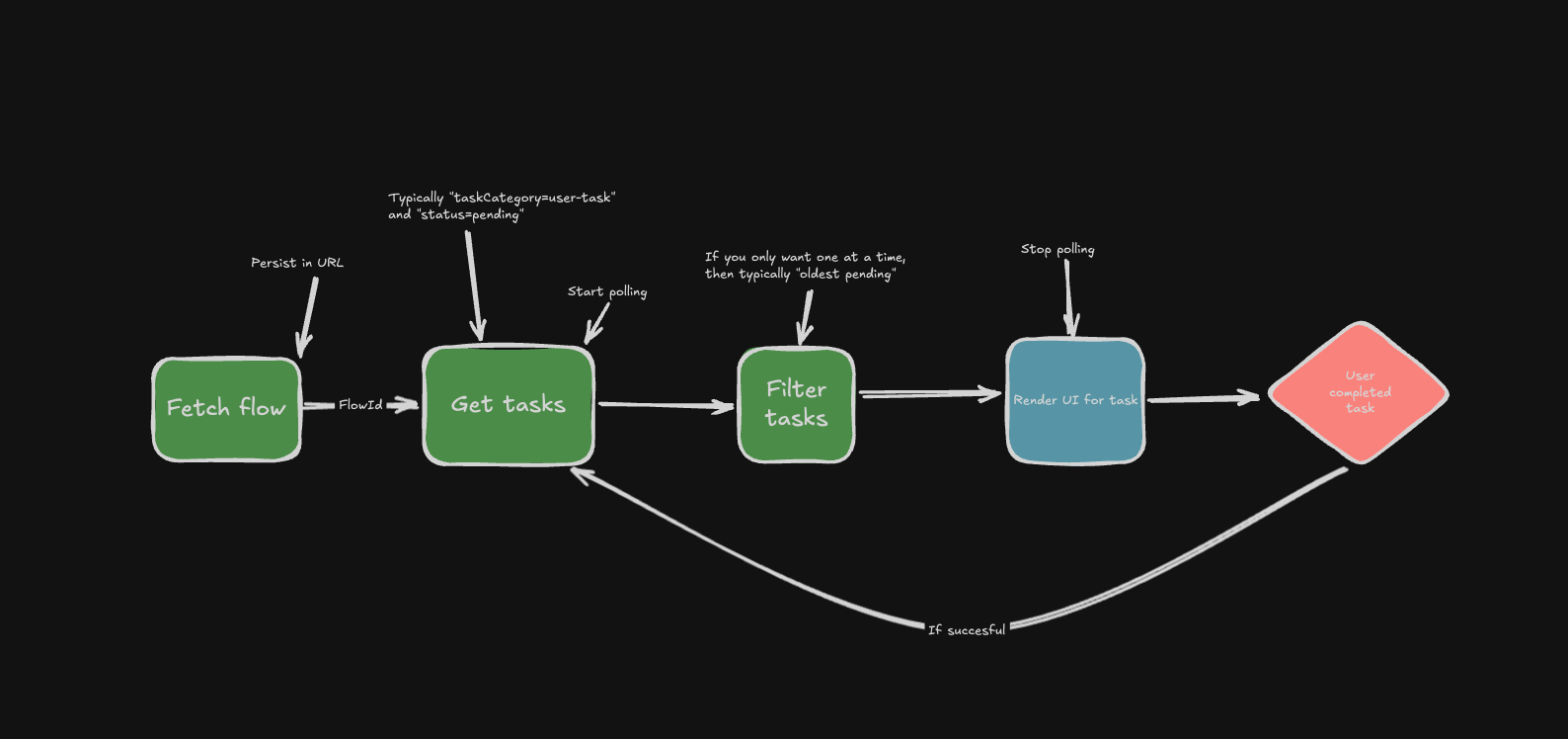
When integrating with the Stacc Mortgage API, we recommend interacting with the API in a certain way to most effectively utilize the task based approach. We want to implement a web page that does what the image above depicts. So we've created some pseudo code below that is based on running in the browser and using react-ish Typescript code.
You should obviously not implement this exact way, but it should give you some inspiration on how to implement the Stacc Mortgage API in your frontend.
Commonly, you complement the API calls in a backend service you build, and request the data from there.
Lets jump into some sample code!
Connection to our API
We need a way to communicate with the API, so we've created some functions below that we can use to fetch the flow and tasks.
// Step 1: Fetch flow information
async function fetchFlow(flowId: string) {
  const response = await fetch(`/api/flows/${flowId}`, {
    headers: {
      'Content-Type': 'application/json',
    },
  })
  if (!response.ok) throw new Error('Failed to fetch flow')
  return response.json()
}

// Step 2: Get pending tasks
async function fetchTasks(flowId: string) {
  const response = await fetch(`/api/flows/${flowId}/tasks`, {
    headers: {
      'Content-Type': 'application/json',
    },
    // Include task category and status in query params
    params: {
      category: 'user-task', // There are some cases where you want to fetch a message-task, but we will get into those later.
      status: 'pending', // You can use other statuses as well, e.g. 'completed', but those are not relevant for the user whilst in progress.
    },
  })
  if (!response.ok) throw new Error('Failed to fetch tasks')
  return response.json()
}

// Step 3: Filter tasks (get oldest pending task)
const filterTasks = useCallback((tasks) => {
  return (
    tasks
      .filter((task) => task.status === 'pending') // Obviously, if we've already use that query param in our request, we don't need to filter here.
      // For some cases you might also want a separate filter
      // that gets all the complete tasks as well.
      // This can be useful for providing context to the
      // frontend on where you are in the process.
      .sort(
        (a, b) =>
          new Date(a.createdAt).getTime() - new Date(b.createdAt).getTime(),
      )[0] || null
  )
}, [])

// Step 4: Complete a task
async function completeTask(taskId) {
  const response = await fetch(
    `/api/flows/${flowId}/tasks/${taskId}/complete`,
    {
      method: 'POST',
      headers: {
        'Content-Type': 'application/json',
      },
    },
  )
  if (!response.ok) throw new Error('Failed to complete task')
}
Polling for data
We'll need to poll the API for new tasks and update the current task when needed. This makes sure that the user is always seeing the latest task and the process is "self-repairing" if they visit it at a later time.
You should not implement polling like this. There are third-party libraries, like tanstack-query, that handles this better.
// Start polling
const startPolling = useCallback(
  async (flowId: string) => {
    if (isPolling) return

    setIsPolling(true)
    setError(null)

    const pollInterval = 2000 // 2 seconds

    const poll = async () => {
      try {
        const tasks = await fetchTasks(flowId)
        const nextTask = filterTasks(tasks)

        if (nextTask && (!currentTask || currentTask.id !== nextTask.id)) {
          setCurrentTask(nextTask)
        }

        if (isPolling) {
          setTimeout(poll, pollInterval)
        }
      } catch (err) {
        setError(err instanceof Error ? err : new Error('Unknown error'))
        setIsPolling(false)
      }
    }

    poll()
  },
  [isPolling, currentTask, filterTasks],
)

// Stop polling
const stopPolling = useCallback(() => {
  setIsPolling(false)
}, [])

// Start polling when component mounts
useEffect(() => {
  startPolling()
  return () => stopPolling() // Cleanup on unmount
}, [startPolling, stopPolling])
Lets also wrap this in a custom hook so we can use later.
export function useTaskPolling(flowId: string) {
  const { currentTask, isLoading, completeTask } = startPolling(flowId)

  return { currentTask, isLoading, completeTask }
}
Rendering our tasks
The task component is responsible for reading the task data and deciding which component to render. Note that we've also included a loading component. The benefit of doing it this way is that we can add some statefulness to our app, and display loading states that are task and context specific.
// Map of task categories to their components and loading states
const TaskComponents = {
  "personal-economy": {
    component: PersonalEconomyTask,
    loadingComponent: () => <PersonalEconomyLoading />,
  },
  "self-declaration": {
    component: SelfDeclarationTask,
    loadingComponent: () => <SelfDeclarationLoading />,
  },
}

// Main task component that routes to specific task implementations
function TaskComponent({ task, onComplete, isLoading }) {
  const taskConfig = TaskComponents[task.category]

  if (!taskConfig) {
    console.error(`No component found for task type: ${task.category}`)
    return <div>Unknown task type</div>
  }

  const { component: SpecificTask, loadingComponent: Loading } = taskConfig

  if (isLoading) {
    return <Loading />
  }

  return <SpecificTask task={task} onComplete={onComplete} />
}
Tying it all together
Lets try to tie together all the parts we've created so far. Here we have two separate pages.
-
Landing page Is often where the user would start an application, or find the already existing flows.
We think it is important to persist the flowId in the URL. This makes it easier to share the flow with the user and also makes it easier to resume the flow from the same place.
// src/router.tsx
import { createRouter } from '@made-up/router'

const router = createRouter([
  {
    path: '/',
    component: () => import('./pages/index'),
  },
  {
    path: '/flow/:flowId',
    component: () => import('./pages/flow/[flowId]'),
  },
])

// Landing page (src/pages/index.tsx)
export function LandingPage () {
  async function startFlow() {
    // Create a new flow
    const response = await fetch('/api/flow-definitions/mortgage', {
      method: 'POST',
      headers: {
        'Content-Type': 'application/json',
      },
    })
    const { flowId } = await response.json()

    // Navigate to flow page
    router.navigate(`/flow/${flowId}`)
  }

  return (
    <div>
      <h1>Start New Flow</h1>
      <button onClick={startFlow}>Start</button>
    </div>
  )
}
- Flow page The Flow page is the bread and butter of the task based flow. It polls the tasks endpoint to find relevant tasks and displays them to the user.
// Flow page (src/pages/flow/[flowId].tsx)
export function FlowPage()  {
  const { flowId } = router.useParams()
  const { currentTask, isLoading, completeTask } = useTaskPolling(flowId)

  if (!flowId) {
    return <div>Invalid flow ID</div>
  }

  return (
    <TaskComponent
      task={currentTask}
      onComplete={completeTask}
      isLoading={isLoading}
    />
  )
}
An important concept here is the lack of any state in our frontend. We just poll the API and it tells us what to render. Each task component/page exists in its own right and is responsible for its own state. This makes it very easy to make isolated changes to each task if needed. It also introduces some difficulties, for example with loading states, where we need other solutions to compensate.
Hopefully this has given you some inspiration on how to implement the Stacc Mortgage API in your frontend.